For solo and small residential cleaning businesses
Know what each cleaning job really earns you.
Price jobs from your own costs, record what actually happened, and see what remains after labour, travel, supplies and other expenses.
A practical Microsoft Excel workbook. You enter your numbers; it does the arithmetic and shows its working.
A made-up job from the workbook's sample data. The last line is the sentence the workbook writes for it.
Turn the work you already do into numbers you can use.
You should not need to become a finance expert to understand whether a job worked for your business.
Price from your costs
Bring together time, travel, supplies, payment fees and a share of monthly overhead before deciding what to quote.
Compare estimate with reality
Record the hours, mileage, supplies and callbacks that actually happened and see why the result changed.
See the wider picture
Track unpaid jobs and review what was left for the month before paying yourself.
Free job check: was this cleaning job worth it?
This is the arithmetic of the free workbook, Was This Cleaning Job Worth It? The figures shown are an example. Replace them with a job you finished recently. Nothing you type leaves this page.
Free, no sign-up. Change any yellow cell to see the result update.
This quick check leaves out monthly overhead such as insurance, phone and software. The full workbook shares that overhead across your jobs. For the example job, that takes the hourly figure from $28.90 to $25.32.
It does not suggest a price or an hourly rate. The price shown is only the one that reaches the hourly figure you chose, assuming fees take the same share of a higher price.
Want this for every job, with overhead, payments and a monthly view? That is what the full workbook does.
From estimate to monthly picture in three steps.
The screenshots use an invented sample business. Yellow cells are for your entries; grey cells are calculated for you.
Each sheet is shown at full size. Swipe sideways inside a picture to see the whole sheet.
1. Set up your numbers
Enter your hourly target, overhead, mileage cost, payment fees and profit target once.
2. Price and record jobs
Estimate a job, choose your quote, then log the real time, costs, payment and any callback.
3. Read the result
See profit by job, earnings per hour, unpaid amounts and the month's operating result.

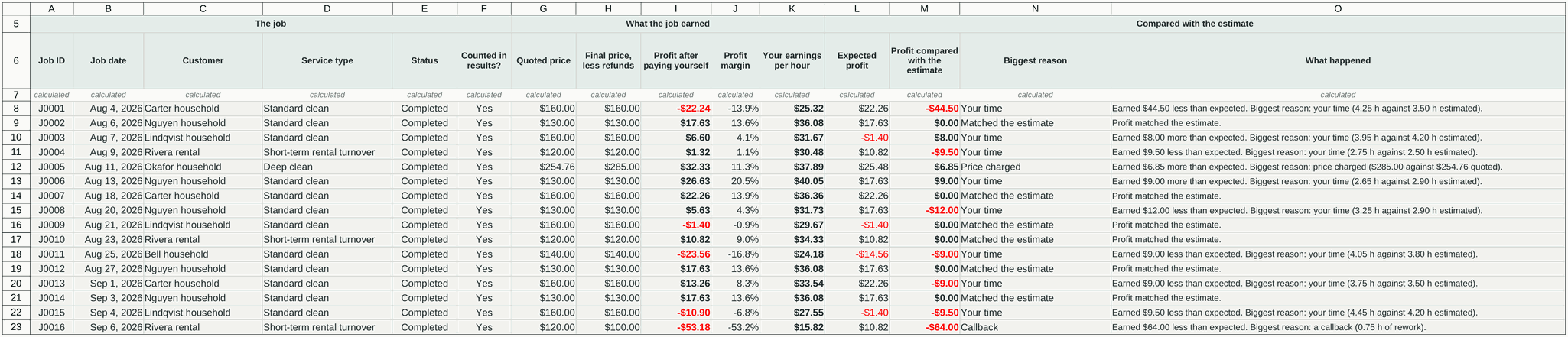
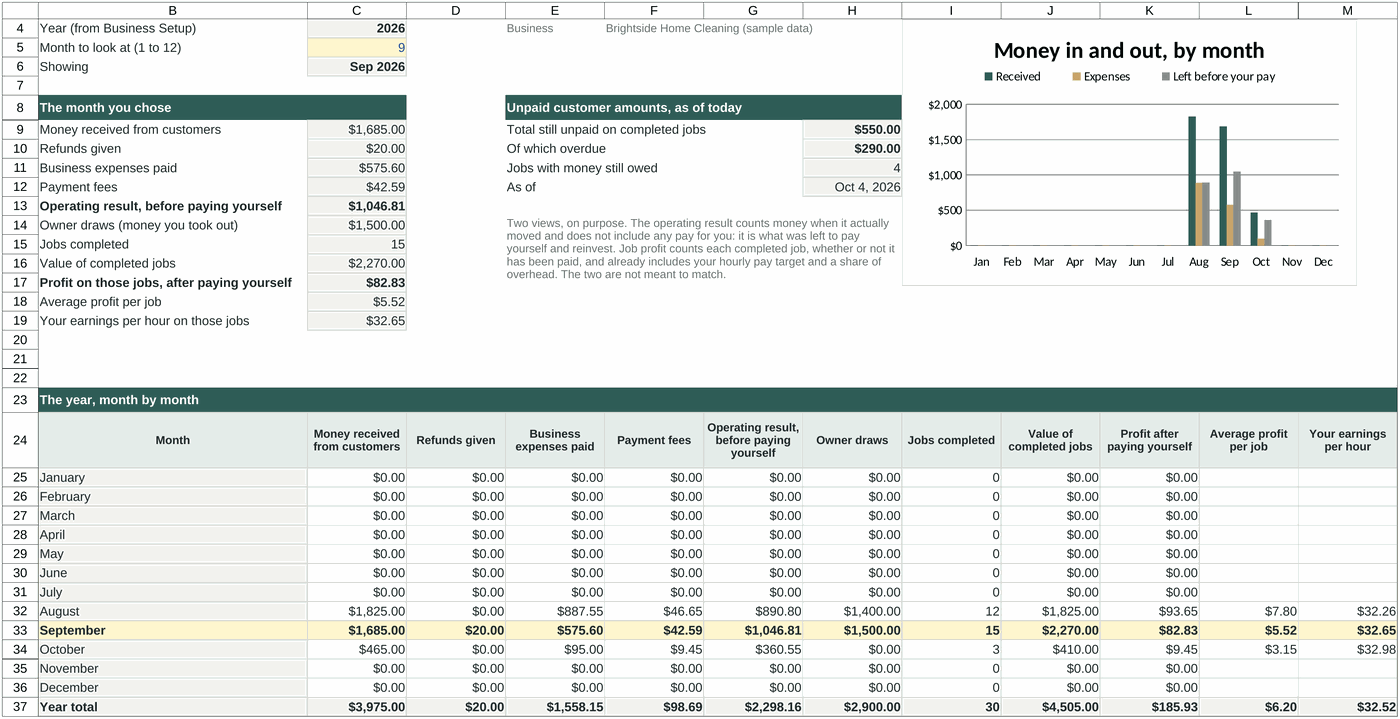
What you receive.
Two Excel files: a clean workbook for your business and a completed sample you can explore first.
Price and review jobs
Business Setup, Price a Job, Job Log and Job Profitability.
Track money and months
Money In and Out, payment status and a twelve-month overview.
Learn as you go
Start Here guidance, a completed example and documented calculations and limits.
See all nine sheets and file details
Sheets: Start Here, Business Setup, Price a Job, Job Log, Job Profitability, Money In and Out, Monthly Overview, Completed Example, and Sources and Limits.
Microsoft Excel (.xlsx), no macros and no internet connection required. Room for 300 priced jobs, 1,000 visits and 2,000 money entries in each yearly file. Formula cells are locked without a password to reduce accidental edits.
Tested in . It has not been tested in Google Sheets or Apple Numbers.
See how the calculations were checked
Every result for the sample business was compared with a separate calculation outside the workbook: 1,295 figures matched. A further 81 checks covered blanks, zeros, formula limits, payments, refunds and rate changes.
Who this is—and is not—for
Designed for: solo residential cleaners and very small U.S. cleaning businesses with real jobs to enter and access to Microsoft Excel. No accounting knowledge is required.
Not designed for: commercial or specialty bids, several crews, scheduling, booking, invoicing, payroll, sales-tax calculations, bookkeeping or tax preparation. It contains no city market rates.
Important limits
This is a calculator and record, not bookkeeping, tax, legal or pricing advice. It calculates minimum and target figures from the numbers you enter; it does not recommend or guarantee a profitable price.
It does not calculate tax, decide deductibility or map expenses to tax forms. It contains no default cleaning times. Each file covers one calendar year.
Cleaning Job Pricing & Profit Workbook
Use your own costs and completed jobs to make clearer pricing and business decisions.
- One payment. No subscription and nothing renews.
- Clean workbook plus a completed sample workbook.
- Download the files after checkout and keep them.
- Refund available within 14 days if it does not suit your business.
Payment and digital file delivery are handled securely by Lemon Squeezy, Orvayla's merchant of record. Your download link is provided after checkout and sent to your email.
Refunds, privacy, license and contact
Refunds
If the workbook does not suit your business, email us within of buying it and we will refund the purchase. You do not need to give a reason.
Refunds go back to the original payment method through Lemon Squeezy, the reseller that processes our orders.
Privacy
The workbook is a file on your own computer. Nothing you type into it is sent to us or to anyone else. It has no macros and makes no internet connection.
The job check runs in your browser. The numbers you type into it are not stored or sent anywhere.
Orders are processed by Lemon Squeezy, our reseller and merchant of record. Lemon Squeezy collects your name, email address, payment details and any tax information under its own privacy policy. We receive your name, email address and order details so that we can deliver the files, send corrections and answer your questions. We do not sell or rent your information.
Learn how Google uses information from sites that use its services.
License
One purchase is a single-business license. You may use the workbook within one cleaning business, on as many of that business's computers as you need, and keep backup copies and a new copy for each year.
You may not resell, share, publish or give away the paid workbook.
The prices and records you create with it are yours.
Contact
Questions before buying, problems with the file, or a refund:
Orvayla Digital Tools is part of Orvayla LLC.